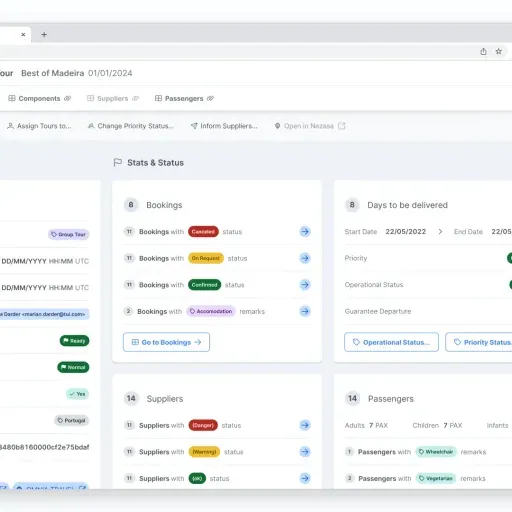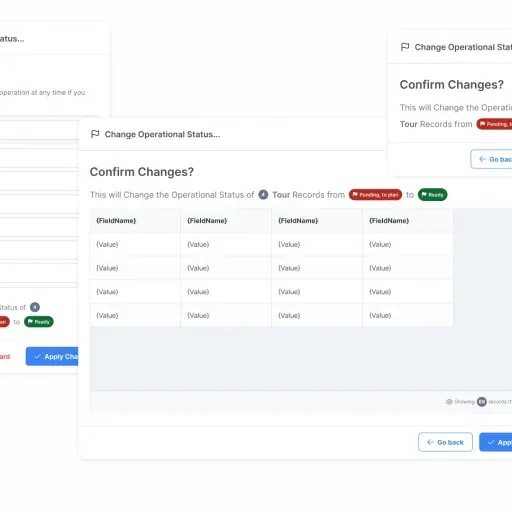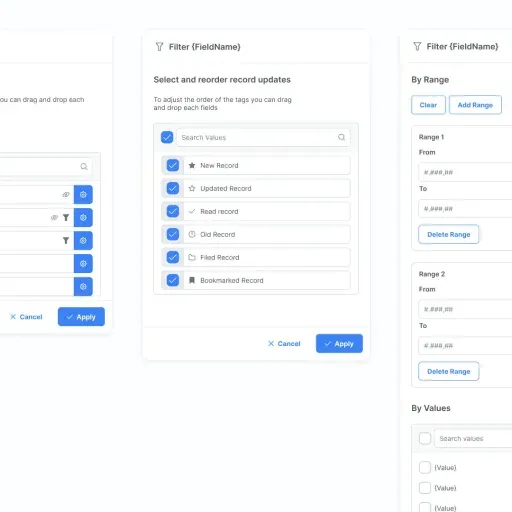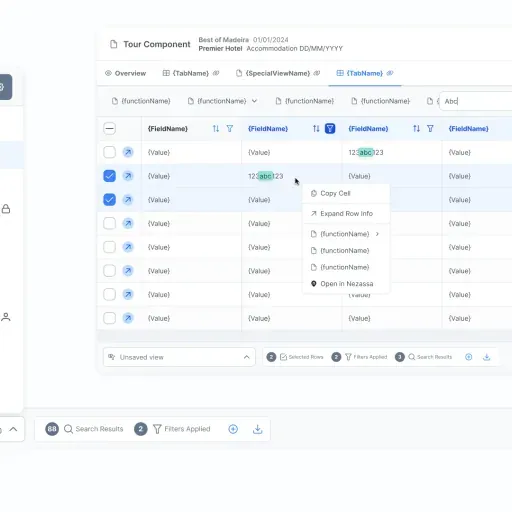

Designed the data architecture and API hub that unified fragmented tools for thousands of passengers and vendors.
TUI’s tours operations coordinated thousands of passengers, vendors, and exceptions across fragmented data sources—making speed and accuracy hard to maintain. I shipped a v1 internal ops hub in ~3 months that unified workflows, permissions, and audit trails, supporting a reported ~50% productivity lift.
Situation
Operations teams coordinating thousands of passengers and vendors across fragmented tools, speed and accuracy could not coexist.
Role
Lead UX Designer @ Softtek EMEA, owned workflow mapping, state logic, and IA
Key decision
Built the workflow and state model before touching UI, shipped a rapid v1 focused on throughput, not feature completeness.
Outcome
V1 in ~3 months. ~50% productivity lift, 20% faster handling, 10% fewer escalations.
TL;DR
Thousands of passengers, dozens of vendors, and a stack of fragmented spreadsheets and legacy tools. TUI’s tour operations team needed speed and accuracy at the same time — but their data lived in too many places to trust any single view. “We needed it yesterday” was the literal brief.
I mapped the real workflows, defined the states and permissions, and shaped an IA the team could run on. V1 shipped in ~3 months with a ~50% productivity lift.
Context
In 2022–2023, TUI’s tours operations needed a central system to coordinate logistics at scale. The risk wasn’t “can we build another internal tool?”—it was operational drift: fragmented sources, unclear ownership, and exception-heavy work that punished ambiguity.
Operations needed confidence to make decisions quickly: what’s confirmed, what’s pending, what changed, and who changed it. Without that clarity, throughput drops and mistakes become expensive. No off-the-shelf platform fit this workflow—the system had to be shaped around how tours coordination actually worked, not how generic ERPs assumed it should.
My Role & Team
I led UX & product design end-to-end as Lead UX Designer (via Softtek EMEA).
- My scope: discovery, workflow mapping, information architecture, permissions/roles, prototyping, usability testing, and stakeholder facilitation.
- Decision ownership: I translated operational reality into decision-ready models (states, rules, auditability) and made trade-offs explicit so the team could ship quickly without re-litigating scope.
- Collaborators: operations, product, and engineering teams responsible for delivery and adoption.
Constraints
- Time pressure: Operations needed immediate value, so we committed to incremental delivery and a rapid v1.
- Fragmented, high-stakes inputs: Many data sources and high passenger volume required traceability and sensible defaults.
- Throughput over polish: We optimized for speed of handling (lists, filters, bulk actions, error recovery) over “app-like” chrome.
- Avoid over-engineering: Reliability and clarity mattered more than feature breadth or a heavy design-system layer.
Approach
I structured the work around one goal: remove ambiguity from operational decisions.
-
Workflows first. I mapped how ops actually worked (assignments, exceptions, confirmations) and used that to shape information architecture and permissions around real responsibility—so the tool matched the organization, not a generic ERP template.
-
Make state and accountability explicit. I defined status logic and auditability as first-class product requirements: what’s true right now, what changed, and why.
-
Design a tool, not an app. I focused on throughput: faster lists, better filters, bulk actions, quick edits, and clear error handling—because speed comes from fewer steps and fewer clarifications.
-
Ship fast, then learn in production. We cut scope to what operations needed most, shipped a working v1, and iterated with real usage instead of guessing in workshops.
Process at a glance
| Phase | What it solved | Output (decision tool) |
|---|---|---|
| Workflow mapping | What ops actually does (and where exceptions break flow) | Workflow + exception model used to shape IA and permissions |
| State + accountability | “What’s true now” and “who changed what” under pressure | Status logic + auditability requirements |
| Throughput design | Handling speed without sacrificing correctness | Lists/filters/bulk actions patterns + error recovery |
| Rapid v1 + iteration | Time-to-value without a big-bang ERP | Explicit scope cut, shippable v1, and learn-in-production loop |
          flowchart TB
s1["Spreadsheets<br/>and email threads"] --> hub["Ops hub<br/>single source of truth"]
s2["Legacy systems<br/>fragmented data"] --> hub
s3["Human hand-offs<br/>and exceptions"] --> hub

hub --> m1["Clear states<br/>what’s true now"]
hub --> m2["Permissions + audit<br/>who changed what"]
hub --> m3["Faster handling<br/>lists + bulk actions"]
Key Decisions & Trade-offs
-
Decision: Build the workflow and state model before optimizing the UI.
- Options considered: Start from screen requirements; copy a generic ERP pattern; map workflows, states, and exceptions first.
- Criteria used: Traceability, error handling, and speed of decision-making under pressure.
- Trade-off accepted: Less time spent on visual refinement early vs fewer “what does this status mean?” problems later.
- Resulting implication: Dependable status logic and clearer ownership, which reduced ambiguity in daily ops.
-
Decision: Ship a rapid v1 focused on throughput instead of feature completeness.
- Options considered: Big-bang ERP build; incremental v1 with clear scope cuts; patch existing spreadsheets/tools.
- Criteria used: Time to value, adoption likelihood, and cost of rework.
- Trade-off accepted: Deferring non-core features and “nice-to-haves” vs landing a usable system quickly.
- Resulting implication: Operations could adopt the platform early and we could iterate based on real usage.
-
Decision: Create a single source of truth by stitching fragmented inputs into one ops hub.
- Options considered: Keep tools separate and reconcile manually; rebuild upstream systems; unify data views and actions with permissions and audit trails.
- Criteria used: Feasibility under time pressure, operational safety, and fewer disputes over “the latest.”
- Trade-off accepted: Working within legacy constraints vs waiting for perfect data foundations.
- Resulting implication: More consistent workflows and less reconciliation work across teams.
Impact
- Metrics:
- V1 shipped in ~3 months.
- Reported ~50% productivity lift for the operations team.
- 20% faster handling, 10% fewer escalations through state models and permissions design.
- Lightweight design system adopted by 2 squads in 6 weeks.
- Qualitative outcomes:
- Centralized workflows reduced hand-offs and made status clarity a default.
- Audit trails and permissions improved traceability and accountability.
- Operations could handle more passengers with fewer steps through bulk actions and quicker edits.
- Design overhead stayed low by prioritizing reliable patterns over a heavy design system.
What I Learned / What I’d Do Next
In operational tools, the “product” is the system: states, permissions, and the way exceptions are handled. When those are explicit, teams move faster because they stop negotiating reality in every hand-off.
Next, I’d deepen instrumentation around exception handling and data quality (where errors hide), and expand the workflow coverage only when adoption data shows the v1 patterns are holding under peak load.
Related projects
If you want the customer-facing side of the same tours business, this marketplace case study complements the ops platform story:

Project Media & Screenshots
Screenshots